Do you remember when your startup idea first hit you?
I definitely do— I was hunting for art for my Seattle apartment and I thought, “why is there no Netflix for art?!”
A few months later I was in Silicon Valley, launching my Kollecto app, negotiating $100K+ in investment, making REAL money and getting featured in Entrepreneur mag
!!!
Crazy, right?
Before all this started, I never thought I’d be an entrepreneur — let alone flying to New York, LA, even Dubai to pitch my company!
🙂
Launching my startup has been one hell of an adventure!
Here’s the thing:
This CRAZY adventure started with a single idea.
Which makes me think:
Because you landed on this blog, I’m willing to bet you’ve got an awesome idea of your own 🙂
And I want to help you find the same success I did.
So I’m actually doing an invite-only webinar, “How to Test Your Startup Idea Without Spending Lots of $$$”
This brand-new webinar is specifically for non-technical folks (like us!) with awesome startup ideas…
Join the webinar and learn:
How to determine whether your idea will make you the money you need and deserve
The ONEmistake most entrepreneurs make that dooms their chance of success… and how to avoid it
How to build the first version of your app YOURSELF… without writing a single line of code
How to grow a wait list of people knocking down the door to try your app before you even start building it
PLUS how to do all this in just 8 weeks!
Thing is, most folks don’t have a TON of time + money to test their startup idea.
But YOU DON’T NEED ALL THAT STUFF
I am living proof of this. Join the webinar and I’ll show you the EXACT same process I used to validate my idea, make my first $35,000, and land $100,000 in investment.
If you need a good laugh, you should try that Google search.
There’s a ton of vague and annoying advice like:
Go viral
Do retargeting
Consider running Facebook Ads
Build an email list through content marketing
Make some videos for YouTube
I’m not saying this stuff is useless.
But for me (someone running an early stage startup & small business) I’ve never been “wow”ed by the results I got from these tactics.
So a few months ago I went on a hunt for non-conventional growth strategies for my startup, Kollecto.
My team & I spent a lot of time experimenting with new strategies, and started to see results with a handful of social media hacks.
So here’s a recap of all the things that worked (and didn’t work) on our journey hacking social media to reach 1000 signups/ mo…. All the juicy details.
Part 1 – How we hacked Twitter to 10x our traffic
Which comes first? The Chicken or the Egg?
Nevermind, don’t answer that…
Here’s an easier question:
Which comes first? The web traffic or the signups?
Obviously it’s the signups, which is why my first goal was to boost the amount of traffic coming to the Kollecto site.
To do this, I leveraged an awesome marketing tool called Socedo.
Using Socedo, we jumped from ~1,000 visits per month to nearly 10,000 visits per month in just a few months.
Here’s how we used Socedo:
We targeted people saying certain keywords on Twitter:
“Wish I could buy art”
“Wish collect art”
“Went to art museum”
“Went to art gallery”
etc.
For example, we targeted people like this:
Socedo hunted through Twitter and automatically found tweets like this for us.
Basically this is what was happening:
And then the software did something really cool.
For each of these Tweets, Socedo:
Followed the lead
Added them to an “Art Lovers” list
Liked their tweet (24 hours later)
And sent the person a DM (if the person followed us back)
DM example: “Hey Chris! Saw your tweets on art. If you’re interested in collecting, check out our Art Collecting School program {link}”
This strategy brought a solid chunk of traffic to our site.
And this was the result….
We went from about ~1000 views/mo in December to almost 10,000 by March.
And almost all this traffic was coming from social media!
Twitter & Pinterest to be exact…
I’ll come back to Pinterest in Part 3 of this post.
But if you need a breakdown of why we saw success with hacking our Twitter account using Socedo…
Here’s what was happening…
Users would see us engaging with them.
Then they would get interested and click one of 3 things:
They would click on the DM link we sent. This was easy to set up because Socedo did all the work
They would click our bio link. This was also easy to set up. We just made sure we had our website url in our Twitter bio
Or they would click on a cool Tweet we posted. This was a bit tougher to maintain, because it meant we had to CONSTANTLY have fresh & interesting Twitter content for people to discover.
That’s where the next hack came in…
Pro Tip:
If you want to try this strategy to 10x your own website traffic, I’m putting together an awesome SuperClass Webinar with tons of gems:
The Socedo targeting strategies that worked & didn’t work
We had all these art lovers clicking on our Twitter page….
And we needed a way to convert them!
And get them to click on our links…
As I was pondering how to tackle this issue, I landed on an awesome podcast episode that gave me a crazy idea!
At our next team meeting, I told my team about my new plan.
So we tried it!
For 14 days…
…we posted 25 tweets/day
And each tweet linked to a blog post!
Here’s what the calendar looked like:
And the results were awesome!!
First, I had my whole team listen to the podcast episode that had inspired the idea. Check it out below if you’re interested! Specific part that inspired me at 26:35
I also had my entire team read Jab Jab Jab, Right Hook – a really insightful book on connecting with customers via social media by Gary Vaynerchuck. We framed it as a fun book club so everyone was super pumped to read, discuss & implement the ideas.
Then we pre-planned ALLLL of our tweets
25 tweets
for 14 days
meant that we had 350 unique tweets to write.
Crazy, right?
Each tweet had totally different copy. We ended up with a MONSTER spreadsheet of planned tweets like this:
Then we started posting.
It felt like we were posting a lot.
But we kept referring to some awesome data that confirmed our strategy:
There are A TONNNN of people running ads on Facebook, Twitter, Google Adwords, etc!
Only a small fraction of those people are running ads on Pinterest.
And since ad platforms are based on bids…
…our money stretched way further on Pinterest when there were fewer people to outbid us!
Cha-ching 🙂
So our Pinterest strategy went like this…
First, we got a subscription to Twenty20.com, which gave us stock photos that look like someone real actually took the photo for Instagram (or something like that).
Pinterest is all about strong visuals, so I knew we needed some “images with character”.
When cropped the right way (we used Canva.com for this), these photos were perfect for Pinterest 🙂
The downside?
Twenty20 access was pretty expensive. They have a secret startup plan, but it’s still not cheap.
So we made sure we fine-tuned our Pinterest strategy before investing.
As we started experimenting with Pinterest, we learned a lot of lessons.
For example:
1. Keyword targeting worked better than targeting by interest.
Here’s what I mean…
On Pinterest, there are 2 major ways to target your audience.
You can target keywords like “street art” or “Bansky”. Keywords = things someone might type in the search bar.
or you can target specific interests like “Art” or “DIY Crafts”. Interests are Pinterest’s pre-built categories.
We landed the best results when we targeted a mix of general keywords and specific keywords, but skipped the “interest” targeting.
Here’s another thing we learned…
2. Vertical images converted better than horizontal images
So we mainly looked for “portrait” photos.
But if there was phenomenal horizontal image, we used Canva to put into the optimal format!
The jury’s still out (we’re still testing), but it sure looks like our Pinterest ads perform better in the afternoon and evening. Buffer noticed the same thing:
Oh, and people responded really well to humor. This was one of our top-performing promoted pins:
We started with a budget of $10/day and grew it from there.
And as a result we DOUBLED the numbers of users signups each month.
BEFORE Pinterest (when we were just hacking Twitter): 540 signups/ mo.
AFTER 1 month of Pinterest hacks: 870 signups/mo
And AFTER 2 months: 1115 signups/ mo.
And the crazy part about it all?
Non-conventional marketing strategies drove all this growth!
Which is amazing.
But there was one last thing that made a huge difference.
We sent our Pinterest ad traffic to an Engineering as Marketing project, which was the trick to converting all this traffic into real app users.
Engineering as Marketing is when you build mini-apps for the purpose of marketing or lead gen.
Our Engineering as Marketing project was a mini-app landing page, that was CRAZY GOOD at converting new users.
When I first pitched the idea to my team they were like:
“What?!”
But the results were AMAZING.
And then they were like:
I’m sharing more about our mini-app landing page projects (the last piece of the puzzle to how all these strategies succeeded) in my upcoming Webinar SuperClass.
If you’re interested, check out the details below.
Otherwise, jump on my email list & I’ll shoot you an update when I share my next blog post.
Thanks for checking out my blog post!
Believe it or not, there was a lot of detail I left out.
So I’m planning an awesome webinar for folks who want to 10x their own website traffic & signups
“A landing page and web presence serves as the hub for all information about your app.” – Whitney Rhodes of Savvy Apps
If you have an app idea, or you’ve just finished the Apps Without Code Bootcamp, and you believe your idea will add utility or entertainment to your audience’s lives, how do you plan to introduce your app to the world?
How will make sure the right audience finds your app?
How will you showcase its purpose and core features?
How will you overcome people’s objections to downloading your app?
This is where your landing page comes in.
At the epicenter of your marketing efforts is your landing page, which, if done right, will encourage downloads, provide a clear explanation of how the app will benefit users’ lives, and more.
We asked Paige Poutiainen, a master funnel creator and conversion copywriter for digital products and services on Upwork, to walk us through the process of building a landing page and putting the right marketing messages in place from ground zero.
With suggestions from Paige, we’re going to cover the most effective strategy for creating a landing page for your app, including:
How people will find your app
What kind of research goes into building your landing page BEFORE YOU EVEN THINK about writing a single line of copy
Which section is key to overcoming your audience’s objections, and more!
Let’s get into the strategy that will help drive people to GLADLY download your app.
YOUR GOLDEN TICKET
“80% of all customer research serves only to reinforce what companies already know, rather than testing or developing new possibilities.” – Rohit Deshpande
We’ve written about the importance of customer research and how to mine for it in a past article. Do yourself a favor and read it, because without intel from your audience, your app won’t get far. We don’t want you saying to yourself, “Damn, I wish I knew this information before building my app”—like these folks.
Here’s the information you’ll be looking to get from your audience:
What are they saying about your competitor’s app?
What features do they love?
What do they hate?
What features are complicated for them to navigate?
Is your competitor answering users’ questions quickly, or at all?
Here are some places you can mine for that information and really get into the mind of your end user:
Dig through your competitors’ reviews on CNET, Apptism, Great Apps, Macworld, and other such tech and app sites.
Conduct 1-on-1 interviews with your users, whether it’s face to face or via a Skype or Zoom phone call.
As Survey Anyplace states, there are some clear advantages to doing an online survey or email. Questionnaires are cost efficient and scalable, you get speedy results, there’s no pressure, you can cover all aspects of a topic, and more. On the other hand, during a 1-on-1 conversation, you may pull out little nuggets of information—a small comment when you let the conversation go off track (just a little)—that you might not get from a questionnaire. These candid insights, however small, can change your approach to choosing and creating the features for your app.
In addition, you can use the exact words from these 1-on-1 interviews in your copy. “How your customers talk,” Paige says, “is how you want to write to get that right tone.”
In the end, whether you do your research in person, through a questionnaire, or by fishing through app reviews on CNET, do a deep, deep, DEEP dive into the niche audience you’re targeting so that you can be confident you’re solving a real problem the right way.
THIS IS A BIT UNCOMFORTABLE
“The campaign style/approach for ads is powerful. If you are going to run FB ads, narrow your audience down to your ideal user.” – Paige Poutiainen
So many developers build an app and think people will FLOCK to it once it goes up in the app store.
That’s very rarely the case.
Paige suggests running Facebook (and sometimes Instagram) ad campaigns to obtain that initial wave of downloads.
“You want to make sure you’re laser focused on a group or niche,” states Paige. “Go as niche as possible because then your ads are more relevant. In fact, go so niche with your online marketing, it makes you and your marketing team slightly uncomfortable. This way you get the most relevant core audience.”
Example: A language learning app for kids vs. a language learning app designed for toddlers 0–3. The latter targets a specific audience.
So if a parent wants to infuse the Spanish language into their 2-year-old’s life, the second app seems more relevant than an app that’s vague on whether it has tools for toddlers.
HOW MANY ADS ARE WE RUNNING?
“Regardless of the campaign goal, everyone wants one thing: To minimize advertising costs. That means cheaper installs and cheaper mobile app engagement.” – Apptentive
Where do you start in running FB advertising campaigns?
We’ve written about it here, but let’s touch on a few points.
Paige suggests running small test campaigns, ranging from 2–5 different ads, starting on Facebook (though Instagram is another option).
Tip from Paige: If you test two different channels at the same time, then the campaigns on each channel should be identical, i.e., same images and wording, same targeting parameters, etc. If you’re testing which channel is more effective in gaining downloads, you have to use the same campaigns in order to get meaningful results.
“Targeting is all about putting your ads in front of the right people. And for us, the right people are the ones who will download, use, and spend money in our apps.” – Apptentive
Here are two tactics for running smarter, more effective ads:
A/B Testing — Test your campaign by running multiple ads on the same platform. There should be 1 SLIGHT DIFFERENCE between each ad, like changing one line of copy or swapping out the image. The main point of doing this is to test out which ad is the most effective in gaining downloads. And changing ONE LINE OF COPY or tweaking an image really can make a difference.
Target users who are interested in your competition. Read their reviews—and improve your product based on that feedback. Perhaps their audience is looking for a change. Offer it to them. It never hurts to position yourself as the ideal solution to their grievance.
Tip: Often overlooked, but vitally important to your app’s success in the app store, reports Apptentive, are all the non-keyword elements that go into ASO (app store optimization). Sure, your keywords should be on point, but if the rest of your app store profile is less than amazing, users won’t be inspired to download. At a bare minimum, your profile needs to include an icon, screenshots of your app in action (or a gif, if possible), a title, a clear app description, and an average rating (hopefully on the high side).
THE KEY ELEMENTS TO YOUR APP’S LANDING PAGE
SECTION I: THE HERO SECTION
“In the first part of your landing page, the Hero Section,” Paige explains, “you should have one core message that is centered around the most important benefit that matters to your ideal user—not to you.”
Meaning, what is the number #1 problem that you are solving for your niche audience?
The key word here is niche. Which of these core messages grabs you more? Broad: Be mindful and meditate.
Niche: Relieve your temple-throbbing migraine in 10 minutes with the Meditations x Migraine app.
Underneath that statement, in 1–2 sentences MAX, you should be able to explain how the user’s life will change after downloading the app.
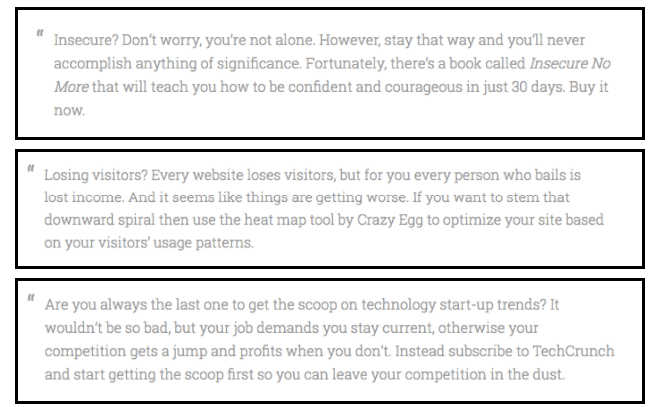
Tip from Paige: Turn to a classic copywriting framework called Problem/Agitation/Solution (or PAS). Identify the problem, stir it up so it hurts to the point of discomfort (remind the user how this problem affects their daily life), and explain how your product relieves this problem.
Here are three examples from Copybot that show PAS in action to promote an ebook, a popular analytics tool, and a major tech media site.
Images from Copybot
Next, if you have any social proof, use it.
Was the app featured on Tiny Buddha or Women’s Health?
Sport your badge of honor either at the top or bottom of the Hero Section, where potential users can’t help but see it. You have about 6 seconds to hook ‘em. You’ve gotta pull them in so they WANT to keep on scrolling down.
SECTION II: BENEFITS & FEATURES
This section is where your customer research comes in handy.
Paige suggests listing the top 3–5 benefits that your audience can expect from your app. These benefits should be short and to the point. And MAKE SURE you list the most important benefit in the eyes of your customer.
Created using ‘Make Your Own Section’ & Canva
Now, how do you determine what that top benefit is?
After all, the most important benefit can be subjective, right?
To summarize content marketing pro Devesh Khanal’s practices, you simply:
List the app reviews in a spreadsheet
Create categories for common themes and mark which theme(s) each review falls into
Image from vwo.com
Total up how many times each theme is mentioned, and you have your most important benefit
Image from vwo.com
After you have determined the most important elements to focus on, Paige suggests crafting your copy to hit emotional triggers.
Michael Harris, CEO of Insight Demand, reports that “95% of our purchase decisions take place unconsciously. Our conscious mind will always make up reasons to justify our unconscious decisions.”
“If you want to influence how a customer feels about your product,” continues Harris, “provide an experience that creates the desired emotion. One of the best ways for a customer to experience your complex product is by sharing a vivid customer story. Stories can activate the region of the brain that processes sights, sounds, tastes, and movement. Contrast this approach to a salesperson delivering a data dump in the form of an 85-slide PowerPoint presentation.”
The last portion of this Benefits & Features Section, states Paige, should be a demo video.
Video is a powerful method for proving that your app does what you claim in your copy.
Slideshow service Animoto reports that “4X as many customers would rather watch a video about a product than read about it.” And Aberdeen Group has found that video users grow revenue 49% faster than non-video users.”
“Video [has become] a mega trend, [over the past] decade. Video will [create] a big shift in the way we share and communicate, as mobile has.” -Mark Zuckerberg
The verdict is in.
No excuses.
Creating an explainer video for your app should be a priority.
Camera shy?
No big deal—you can hire a voice-over actor from Fiverr, Upwork, or Voicebunny to narrate a whiteboard explainer video.
But if possible, Paige suggests, getting the creator of the app to tell the story of how the app came about—a “Behind the Software” video about what you’re hoping to accomplish, features the user should be excited about, and more.
The creator of the Most Funded App Ever on Kickstarter
Tip from Paige: If your sales page is a little on the long side, sprinkle 2–3 CTAs (calls to action) throughout.
Why?
Because you don’t know when your visitors will be ready to download your app. Thus, you always want them near a download button so that when they think, “Let’s do this,” there will be nothing—not even the need to scroll—standing in their way.
BUT WHAT IF…
Do you know how you’re going to overcome the “but what ifs”?
You know…the objections a visitor might have to downloading your app.
This is why the FAQ, or Frequently Asked Questions, is one of the most important sections of your landing page.
In a previous article, we said you need to consider your FAQ section to be the first line of defense for fielding visitors’ queries.
Trust me, you want to implement this “self-help” solution, as opposed to depending on customer support agents (who will get back to users in 12 hours), or seeing the the same questions in your inbox over, and over, and over again.
And an added bonus…
Gather EVERY. SINGLE. QUESTION. anyone has ever asked you about your app and wrap those questions in Header tags in the FAQ section.
Using Header tags will allow those questions to rank in search engine results, improving your SEO and potentially increasing traffic to your website.
You’re welcome, SEO junkies.
In the FAQ section of your homepage, aim to answer about six of the biggest questions and objections your audience will have about downloading your app.
Some of the common questions Paige has encountered:
Do I have to pay for this?
Is this a monthly recurring payment?
What are your terms for data privacy and how will my information be used?
Why is your app better/different than [your competitor]?
Paige explains that you can always create a more in-depth FAQ section within a Help Center, Knowledge Base, or Support Page,” but the core objections—in your user’s mind—should be confronted on the app’s landing page. When Microsoft reports that over 86% of the 5,000 people they surveyed expect a brand to have a FAQ page on their website, it’s probably wise to follow the trend.
CONCLUSION We just went over all the elements of building a landing page for your app, from scratch, with the help of copywriting wizard and landing page creator Paige Poutiainen.
If you want to focus on the right elements to find your ideal audience and build traction for your app, this guide should get you a good head start.
Have you built an app in the past? What was a successful strategy or tactic you used? Share it with the community and leave your wisdom in the comments below.
Right now I’m really excited about Batch 4 of Apps Without Code Bootcamp, which just started (if you’re not familiar with the Bootcamp, it’s a 12-week “Startup School” we run for non-technical founders — you can learn more over here)
A big reason why I’m so excited?
Here’s one:
The companies in the Bootcamp are not your traditional Silicon Valley tech startups.
Most of the Bootcampers have expertise in a non-sexy industry where they see huge opportunities for tech. For example, Patrick Anderson (CEO of OpExApps) is an alumni of the program. He built a process tracking app for manufacturing assembly lines & has already licensed his app to Coca-Cola. Alivia Blount (CEO of PreUni) is building apps for competitive preschools & the parents applying to them.
I get kind of bored with the regular Silicon Valley app that’s cute, but has no revenue-generating business model. So, I’m super excited about this new batch of entrepreneurs who are creating generational wealth by solving real problems in lucrative industries. I think that’s what makes the Apps Without Code program really different.
Say hello to Batch 4 of Apps Without Code Bootcamp:
Previous Work: Co-founder at Tie In, a digital marketing firm giving minorities career-building opportunities; 2nd place winner at Startup Weekend: Oakland LatinX edition, October 2016
Scholarship: Received a scholarship from the Kapor Center to attend Apps Without Code Bootcamp
Location: San Leandro, CA
PreUni*
An app to connect parents with preschools to streamline the application process
Founder: Alivia Blount
Previous Work: Data Analytics & Machine Learning Intern at Intuit
Scholarship: Received a scholarship from the Kapor Center to attend Apps Without Code Bootcamp
A digital platform to help physical education instructors deliver fitness, nutrition, meditation/mindfulness programs and verify activity using affordable wearable devices
Co-Founder: Eugene Baah
Previous Work: Organizational design at IDEO; business development & finance at Microsoft
Scholarship: Received a scholarship from the Kapor Center to attend Apps Without Code Bootcamp
Interested in joining the next batch of Apps Without Code Bootcamp? Learn more about the program, available scholarship opportunities, and apply over here
If you’re a startup founder, chances are you’re not an HR expert.
Maybe your “thing” is product, or marketing, or maybe design. But it’s (probably) not HR.
That’s OK!
You don’t have to be an HR ninja by any means, but working on a time crunch and a limited budget means you do have to be smart.
The good news is, it doesn’t take a whole lot of time or money to do this right.
Over the last 3+ years, I’ve hired 9 full and part-time employees for my startups (way more if you count every freelancer and VA), and I’ve boiled down my process into 3 simple steps you can take to find & hire the right folks.
3 steps to find & hire the right person for your startup
1. Create a job post that’s raw & real
I write pretty unorthodox job postings.
More than simply list requirements and tasks, I want my job posting to reflect the culture of my company — something that really stands out and catches the attention of the right kind of person.
How do I do that?
I actually write each job posting as a letter.
This is something I picked up from Danielle Morrill, CEO of Mattermark (here’s the post that inspired me).
The idea is to be totally real and authentic.
Lay out exactly what you’re looking for, and paint the picture of what it’s actually like to work with you.
For the candidate, it’s a chance to instantly decide whether or not you and your company may be a good cultural fit. It’s like they’re talking with their future boss.
Here are a few things I include in every job posting:
High level outline of responsibilities (vs. listing out each and every task)
How the team works
What our culture looks like
What it’s like to work with me
This last part is really important. I actually survey my team to make sure I’m presenting myself accurately. Ask your team “what’s it like to work with me?” and encourage them to be completely, totally honest.
This actually gets a lot easier the longer you’ve been running your startup. Once you’ve developed a solid network, you can crowdsource the job search to find highly qualified candidates.
If you can’t find someone that you know, though, don’t panic! Do these 3 things instead:
Share the job posting with your email list
Once you’ve got your letter written (see Step #1 above), send an email to your audience. I’ve gotten good results sharing open positions with my list because they already know the business and are fans of the brand.
I usually include a “day in the life” picture of what the job looks like. Breaking down a typical day hour-by-hour is an easy way to illustrate key responsibilities as well as company culture and values.
Have fun with it. I usually throw a GIF in there to keep it entertaining.
Also, be sure to ask folks to forward the posting to anyone they think might be qualified + interested.
Promote the position on social media
Next, take that email and adapt it for sharing on your social channels. Go where your audience is most active. For me, that’s primarily Instagram, but I also share open positions on Facebook and Twitter.
Go into Canva and create an eye-catching graphic for your posts.
Here’s a post I shared on Instagram:
Post the job on AngelList
AngelList is like LinkedIn for startups. I’ve had a lot of luck finding high-qualified talent here.
You don’t have to be a sexy tech company to use AngelList, but if you’re looking to hire people who are tech-savvy or kinda scrappy (important traits for most startups), this is a good place to start.
You can be really specific on AngelList.
Potential candidates can use search filters to sort jobs by type (full-time or contract), compensation (salary and/or equity) and role.
AngelList also makes it easy to designate specific jobs as remote, which is helpful if you’re like me and building a distributed team.
I just have interested AngelList users email me directly, but you can also set it up so candidates apply directly through the platform.
Of the 3 places we promote our positions (email, social media, AngelList), this one consistently gets us the best results. Typically within 24 hours of posting a job, I’ve got an inbox full of (mostly) qualified candidates.
3. Hire with a 3-part process
If you’ve written a killer job description and you’re leveraging your network / promoting the position properly, your posting will quickly draw a lot of responses.
Next it’s time to narrow the field!
I follow a 3-part process for this:
Part 1: The First Interview
I schedule a quick 15 minute phone call with the top applicants. Try and keep this manageable — a first round of 5-10 candidates is probably good.
The first interview is all about figuring out two things:
Does the person know their sh#t?
Is the person a good cultural fit?
Don’t get too nitty gritty here. You’ll know whether they check the boxes within a few minutes.
Use a Hiring Scorecard
With 10+ candidates to interview in the first round, keeping track of everyone’s strengths and weaknesses is tough. Make it easier on yourself by using a Hiring Scorecard.
I got this idea from Greg McKeown. He wrote a super great book called Essentialism: The Disciplined Pursuit of Less. My friend Thomas said it was awesome, and it totally was.
Seriously, go read that!
It’s all about the importance of boiling down your business to what’s most important.
Which is exactly the point of the Hiring Scorecard.
How to Create a Hiring Scorecard
List out the “essentials” that your new hire must have. These can be skill-based traits (e.g. “Analytical”), super specific task-based requirements (e.g. “Ability to get and land the meeting with Heather McGough”), or more general essentials like “cultural fit.”
Create a spreadsheet in Google Sheets. These “essentials” should be your rows. Your candidates are your columns.
Fill in the scorecard as you do the first round of interviews, ranking candidates’ ability to meet each “essential” on a scale of 1-10.
At the end of the first interviews, average your scores and advance the high-scoring candidates to the next round. I typically advance anyone that averages an 8 or higher.
Part 2: Case Study
This part is super important. This is your top candidates’ chance to show what they’ve got.
Once you’ve completed the first interview and the hiring scorecard, send your finalists a case study.
***NOTE: Some people will weed themselves out simply by not doing this. That’s valuable by itself!
The case study should be something super relevant to what this person would be doing if they came onboard.
Here’s an example case study I recently used:
Note that there aren’t any response format requirements. I like to see how candidates respond. Sometimes it’s a super polished deck, other times it’s a simple email reply.
Also important — when I put together a case study, I always give folks more information than they need.
In startup life, you’ve got to be able to sort through the clutter and figure out what’s actually important, so this is a good way to ensure your applicants have this skill.
Part 3: The Final Interview
Once you’ve reviewed the case studies, narrow the field to 2-3 finalists and schedule a final interview.
This should be longer and more in-depth than the first interview, and you should draw upon their case study to evaluate the candidate’s experience and understanding.
That’s it!
By this point, it should be clear who you need to hire.
Now you’ve got to make the offer!
For early stage startups, this part is critical. Over time, I’ve learned a few lessons (some the hard way) and now follow a few important rules.
Rules for hiring a new employee for your startup
Hire on a 3-month contract
I always hire new employees on a 3-month contract to start.
This “trial” period gives both sides an opportunity to see if it’s a good fit.
By the end of 3 months, you should easily know whether or not it’s working.
If it is working, awesome! Extend the contract or bring them on full-time.
If it’s not, bummer, but not the end of the world. Pulling the plug at the end of a short-term contract is way less messy than it otherwise could be.
Start new hires as independent contractors
Regardless whether you plan to make the role full-time in the future, it is way easier (and much cheaper) to start folks as independent contractors and then go from there.
Bringing on a contractor vs. a regular employee will save you a TON of money in taxes, benefits etc. — which is critical because you’re not even sure if this is a long-term thing.
Onboarding a new hire is EXPENSIVE!
Don’t make a bigger investment until you know it’s going to work.
Start everyone at the same flat rate
I hire everyone at the same flat amount. It used to be $2000/mo. and now it’s $3500. I don’t budge on this. Once a new hire hits 3 months, there’s some flexibility, but this way everyone starts on a level playing field and you can quickly determine how committed (or not) they are to the company.
I’m very transparent about this policy. Everyone knows what new hires are making, and everyone’s been there before themselves.
This builds trust and eliminates any question of unfairness.
Start at a 30hr/wk contract
Whenever I bring on a new hire, I start the contract at 30hrs/wk.
I do this for a couple reasons:
The person who is really motivated is going to turn this into 40hrs/wk anyway 🙌
This gives folks some wiggle room to maybe take on another contract while they’re not making as much
Two things I’ve learned
I’ve learned a LOT hiring employees for my startups. I’ve tried to share as many of those lessons as possible in this post.
Recently, though, two things stand out:
1. I do less hiring via AngelList and other job boards now & instead hire people I know
This is a lot easier now because I’ve worked with lots of people and have a pretty big network to call upon.
2. There’s a lot of opportunity to get people to join your team w/o paying a lot
This is something I wish I realized earlier. But quite frankly, there are lots of ways to get high-quality talent for free (or close to it).
Beyond hiring an intern (another good option), a lot of companies now are creating fellowship or apprenticeship programs.
I highly recommend doing this.
Fellows / apprentices are your “superfans” — they’re typically your best customers, and they’re thrilled to join the team for way less than most folks would demand.
I actually launched a fellowship program for Apps Without Code last year.
I do pay my fellows, but they’re all alumni of my Bootcamp program and work on my Education team. For 5-10 hours per week, our fellows lead workshops and support our students in exchange for a $5000 stipend which they can invest in their own startups. I also offer our fellows free 1:1 coaching, as well as access to my network for referrals, PR opportunities etc.
(You can actually check out the “job letter” I use for my Fellows program over here)
The point is, there are all sorts of ways you can do this.
One of my favorite brands, Travel Noire has a super successful fellows program, and I took cues from its founder, Zim Ugochukwu, in setting up our own program.
Basically, Zim made me realize that as a startup founder, people are inspired by your story and super excited about your brand (it can get a little cult-ish lol). You can (and should) leverage that excitement with a low-cost, high-impact fellowship or apprenticeship program.
What’s your secret?
Are you a startup founder? What’s working — and what’s not — when it comes to finding and hiring qualified employees? I’d love to hear what you’re doing in the comments!
I was doing a coaching call with an entrepreneur the other day, and she said something interesting. Jerrica is a student in my Apps Without Code Bootcamp working on a women’s comedy app.
Here’s what Jerrica said:
“When I look at my competitors and what they have, and I look at my measly little blog, it feels like nothing.”
Okay, so that sounds pretty bleak, right?
Pouring your heart and soul into your startup, feeling like it’s all for nothing… that sucks.
But here’s the thing:
This kind of self-doubt is super common!
I hear entrepreneurs ask these sorts of questions all the time:
Is what I’m doing actually valuable?
Why would anyone listen to me?
Do people even want this thing?
I still ask myself these same questions!
As entrepreneurs, we need to keep it all in perspective.
In Jerrica’s case, she was worried the design and content of her blog wouldn’t stack up against her competitors.
Two SUPER important things to keep in mind when you’re afraid to launch your website:
The majority of people looking at your website have NO IDEA your competitors exist (or at least, how their design and content compare to yours)
The first version of your website will be BUTT ASS UGLY
When you accept this reality, taking your first website live becomes a LOT less scary!
In fact, whenever you find yourself scared to pull the trigger because you don’t think your idea is good enough, or your website is pretty enough, or your content is interesting enough … just remember, if you don’t keep things in perspective, you’re never going to take the kinds of risks necessary to succeed.
A bunch of other folks have summed it up this way:
Don’t compare your beginning to someone else’s middle.
You have opportunities you never thought possible. You meet so many cool and inspiring folks. Your work is fulfilling. Maybe you even get to travel the world…
There’s a flip side to all this stuff though:
Starting a business is also a LOT of work— and sometimes it can feel like you’re just barely keeping up with it all…
As an early stage startup founder, you’re responsible for EVERYTHING:
Validating your idea
Launching your website
Developing your app
Marketing your company
Pitching investors
Research & development
Plus, you know, paying freelancers, employees, and just keeping the lights on 🙂
It can be super overwhelming!
So I want you to pay close attention to this and really take it to heart:
Nothing is more valuable than your time.
So if you want to maximize your profits (and maintain your sanity) you have to AUTOMATE everything you possibly can!
And one of the fastest, easiest, and most affordable ways to automate stuff is with Zapier.
Zapier is hands-down one of the most valuable tools I’ve used to grow my business. And I’m breaking down exactly why in this episode of Tara’s Toolkit!
No matter what kind of business you’re building, Zapier makes it super easy to connect applications and automate repetitive tasks… so you can spend your time on other, more profitable activities.


 Which makes me think: